
- Where is the settings page for Contact Form 7?
- How can I put a contact form in my post content?
- My contact form doesn’t appear. Instead, a code [contact-form-7 404 "Not Found"] appears.
- How can I add a field to my contact form?
- Nothing shows up in the email, even after adding a tag to the form! How can I include a new field’s input in the email?
- I get emails containing codes such as [foobar]. What’s this? I want to see the user’s input.
- Are there any reserved or unavailable words for the name of an input field?
- How can I specify a subject for the email?
- Can I see the messages submitted through the contact form?
- Can I implement autoresponder?
- I can’t add an input field to the form. The form-tag code appears instead of the field.
- I’ve set the id option, but it doesn’t work as expected. The id attribute doesn’t appear in HTML.
- Mail that comes through the contact form shows “WordPress” as its sender name. How can I change this?
- Can I place a contact form outside a post?
- Can I embed a contact form into my template file?
- After submitting the form, I get an error message stating “There was an error trying to send your message.” What is wrong?
- I get an error message with a red border. So, how can I solve this?
- Why do I get an error message with an orange border?
- I see a response message “Thank you for your message. It has been sent.” with green border, but I never receive a mail for that.
- My contact form always redirects to 404 error page after submission.
- The spinner icon shows up once I submit a form, but then nothing happens.
- My contact form behaves oddly on certain browsers.
- I want to use contact form in my language, not in English. How can I do that?
- CAPTCHA does not work; the image does not show up.
- CAPTCHA’s text input box is working on Internet Explorer, but not with Firefox. I cannot enter the code.
- File upload and file attachment do not work.
- Does Contact Form 7 support HTML5 input types?
- Why does my email address input field look different than other text input fields?
- Can I add id and class attributes to a form element?
- How can I export/import contact form data?
- Can I add text labels to input fields?
- Does a contact form work on a page with JavaScript deactivated?
- REST API is deactivated on my site. Can I use Contact Form 7?
- After submission, my contact form redirects to a URL followed by an unfamiliar code like #wpcf7-f123-o1. Why?
- DOM event doesn’t work.
- Is Contact Form 7 compliant with GDPR?
- Does Contact Form 7 track our personal data by stealth or transfer the data to external servers?
- I get spam messages through my contact forms. How can I stop them?
- Can I edit the label text on a file uploading field?
- Why do field names start with ‘your-‘?
- Why do you use the same message for mail failure and spam cases?
- Can I get previous versions?
- I get the error message of “This contact form is placed in the wrong place” instead of the form itself. What does this mean?
Where is the settings page for Contact Form 7?
Log into WordPress and open Contact > Contact Forms.
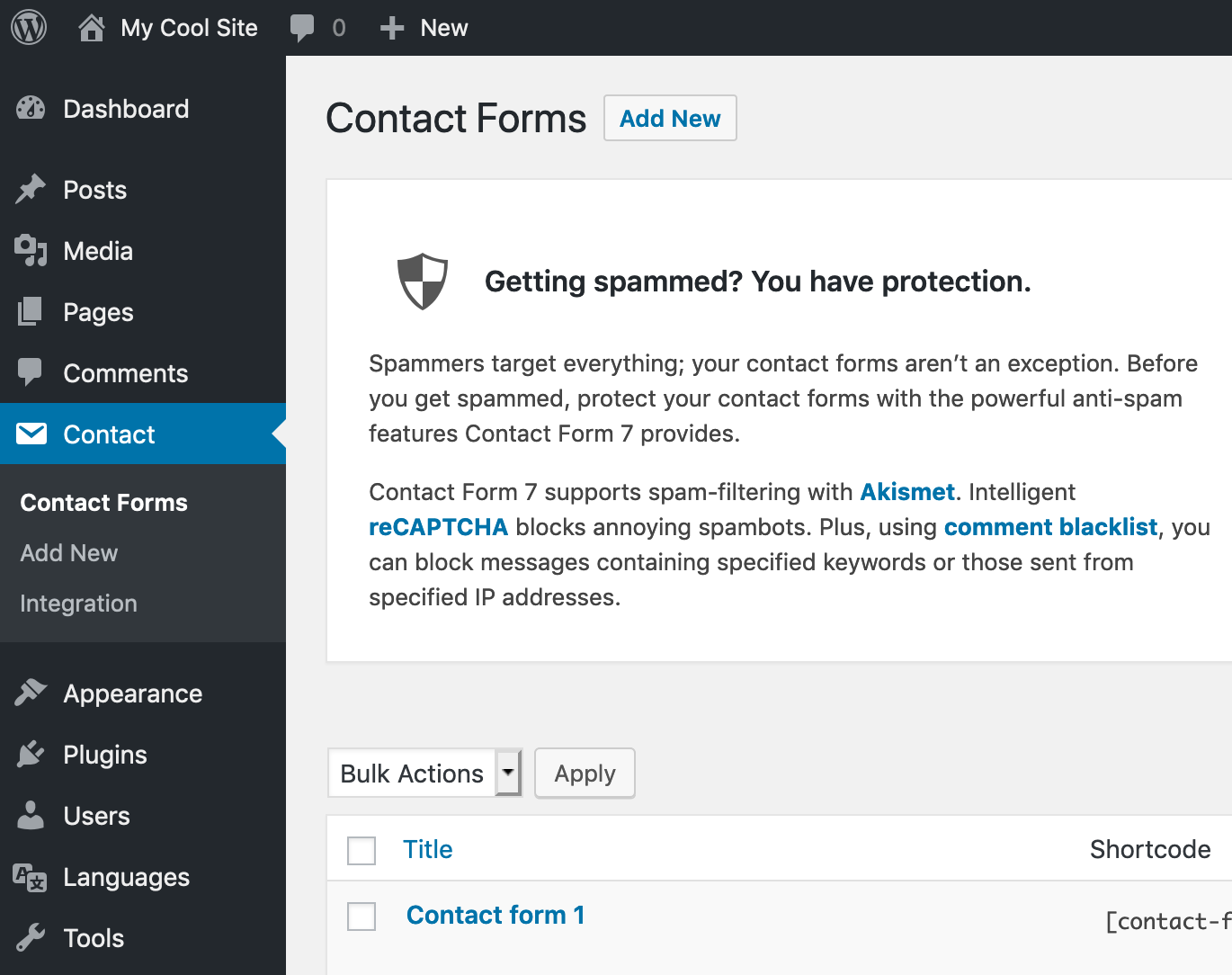
See also: Admin screen
How can I put a contact form in my post content?
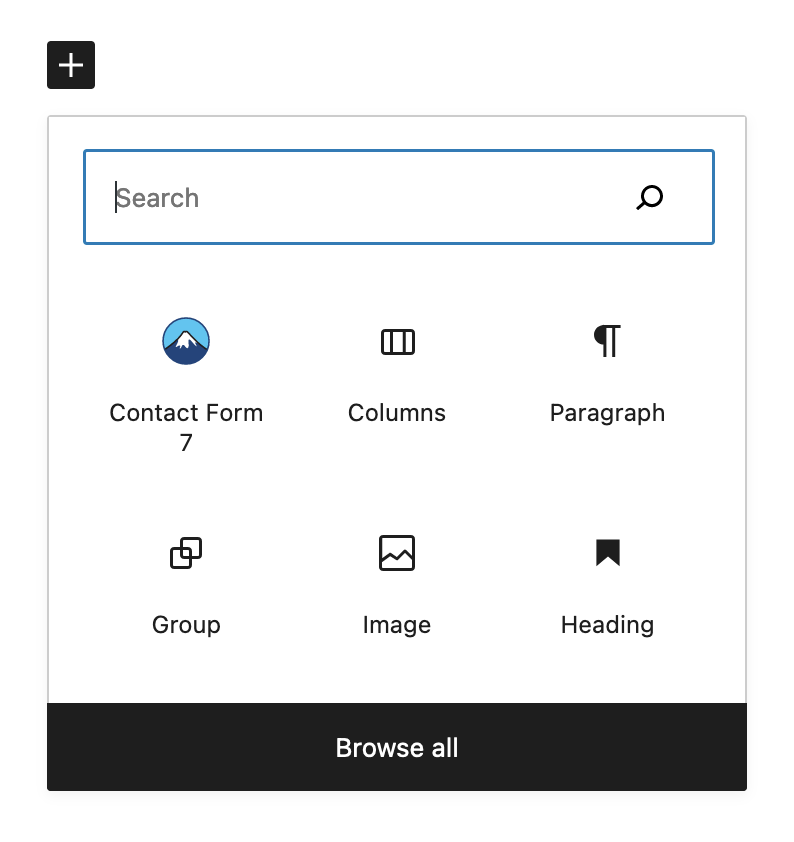
The simplest and recommended way is to use the contact form selector block. In the WordPress block editor screen, select the Contact Form 7 block with the familiar mountain icon, then choose the contact form to put in.
Also, the traditional way using the WordPress shortcode is still available. In this case, you need to manually copy the shortcode of the contact form and paste it into the post content. Use the Shortcode block if you use the block editor.
My contact form doesn’t appear. Instead, a code [contact-form-7 404 "Not Found"] appears.
The code [contact-form-7 404 "Not Found"] is a sign that the contact form specified by the shortcode (described in the previous answer) couldn’t be found. Make sure you are using the correct shortcode.
How can I add a field to my contact form?
Insert a form-tag into the Form tab panel field. For more details about form-tags, see How Tags Work.
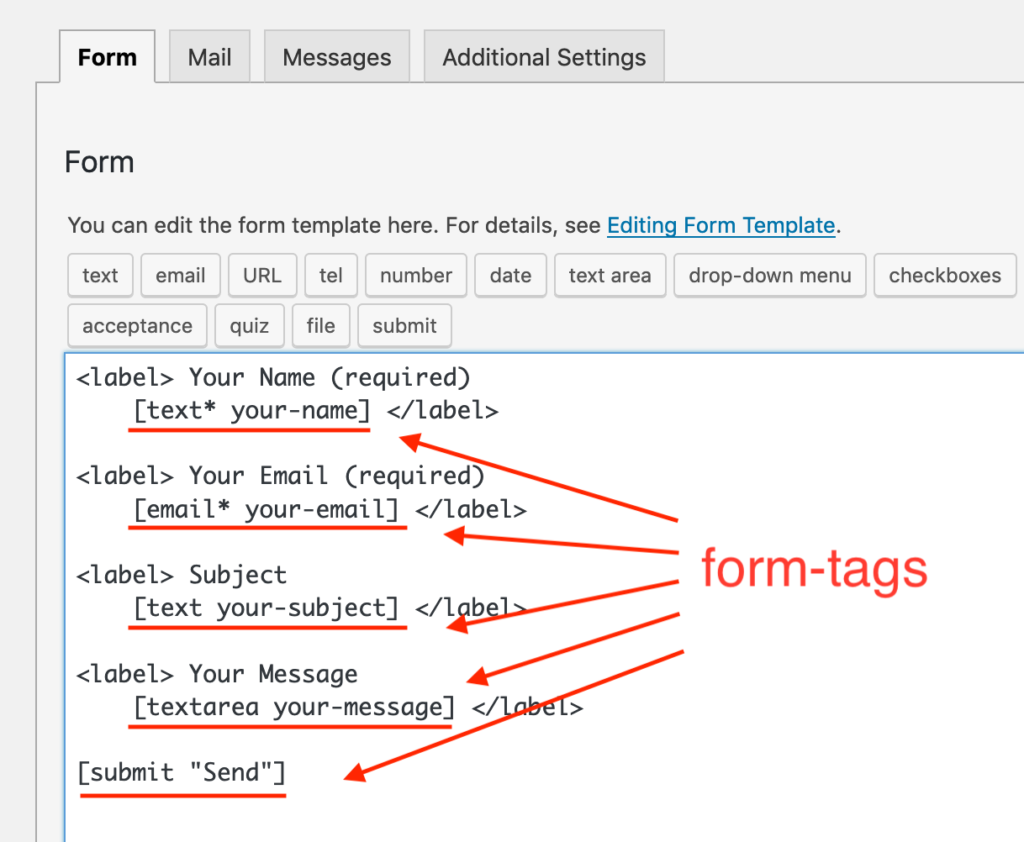
You might feel that the form-tag syntax is a bit difficult to learn first time, but you don’t have to worry about that. The tag-generator buttons above the input area assist you.
Nothing shows up in the email, even after adding a tag to the form! How can I include a new field’s input in the email?
You need to add mail-tags to the fields in the Mail tab panel. These tags need to correspond to form-tags used in the Form tab panel. For example, when you used a form-tag [text your-new-field], the corresponding mail-tag that you should use in the Mail tab is [your-new-field]. For more details, see How tags work.
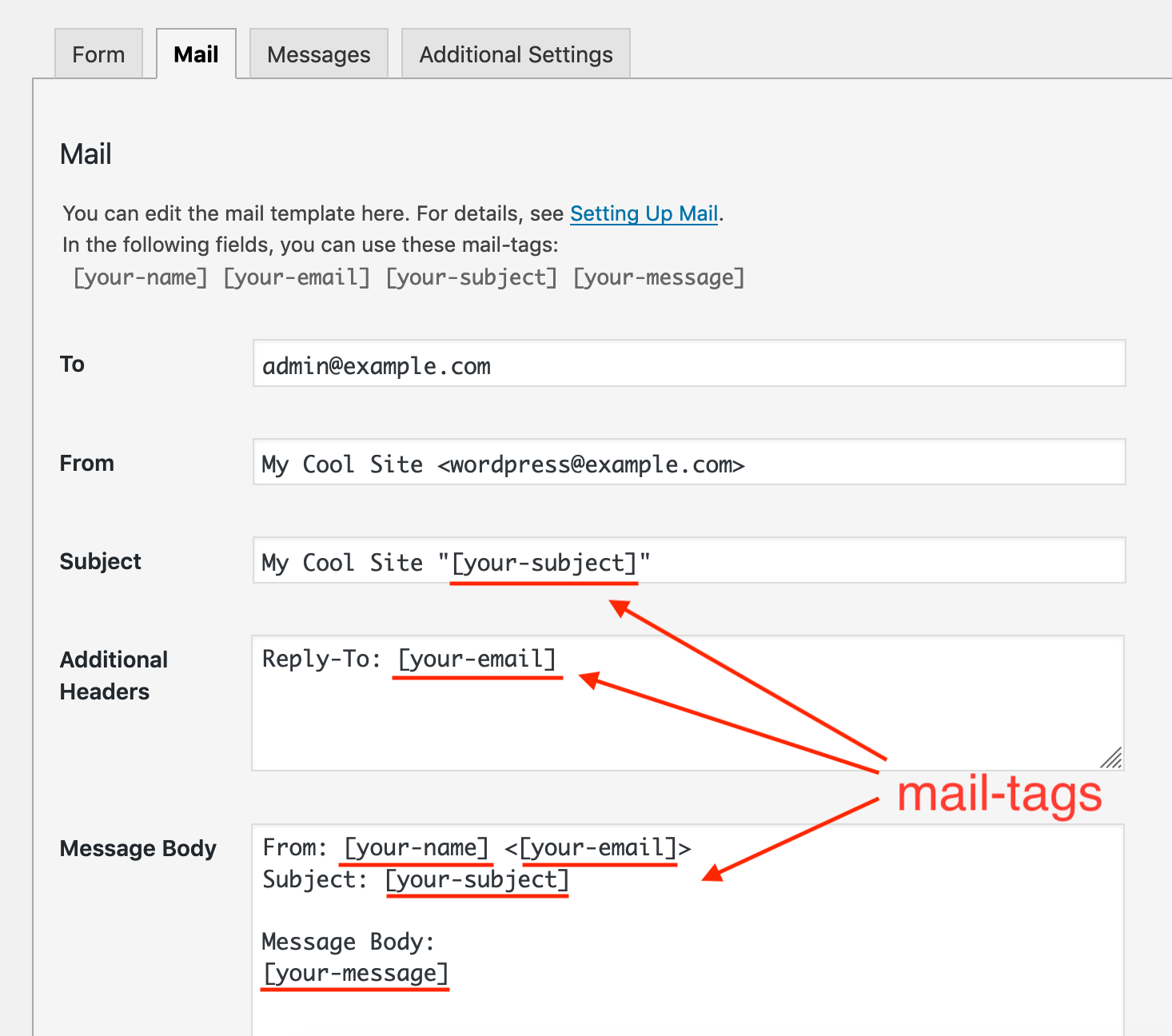
A mail-tag in the Mail tab panel will be replaced with the user input to the corresponding form field.
I get emails containing codes such as [foobar]. What’s this? I want to see the user’s input.
See the previous answer. In this case, no form-tag corresponds to the [foobar] mail-tag. A mail-tag which has no corresponding form-tag will be left alone without replacement.
Are there any reserved or unavailable words for the name of an input field?
Yes, there are some words that are not available; but this is actually not a restriction of Contact Form 7, but a restriction of WordPress.
If you post an input field with a name that is the same as a parameter name already used in a WordPress query, WordPress will confuse them, so you can’t use that name.
The followings are parameter names that WordPress uses in a query: m, p, posts, w, cat, withcomments, withoutcomments, s, search, exact, sentence, calendar, page, paged, more, tb, pb, author, order, orderby, year, monthnum, day, hour, minute, second, name, category_name, tag, feed, author_name, static, pagename, page_id, error, attachment, attachment_id, subpost, subpost_id, preview, robots, taxonomy, term, cpage, post_type, and embed.
For example, ‘name’ is used in the query, so ‘name’ is not available for a field name. The best practice in avoiding unavailable names is adding a prefix or suffix to the name, for example, use ‘your-name’ or ‘name-1234’ instead of ‘name’.
See also: My contact form always redirects to 404 error page after submission.
How can I specify a subject for the email?
Simply edit the Subject field in the Mail tab panel.
Can I see the messages submitted through the contact form?
Contact Form 7 doesn’t save the submitted messages. To manage messages through Contact Form 7, you need to install Flamingo (another plugin created by the same developer).
Can I implement autoresponder?
Yes, you can. Select Use Mail (2) in the Mail tab panel and set up Mail (2) as the template for autoresponder email. Mail (2) is an additional email template which works in the same way as the primary Mail template, but Mail (2) is sent only when Mail has been sent successfully.
I can’t add an input field to the form. The form-tag code appears instead of the field.
Make sure that the form-tag is in the correct syntax. A frequently seen mistake is the wrong order of form-tag parts, particularly the case in which values come before options.
I’ve set the id option, but it doesn’t work as expected. The id attribute doesn’t appear in HTML.
Please be aware that the id HTML attribute must be unique in the entire document. Having multiple elements sharing an identical id value is invalid in HTML and can lead to unexpected behavior on the browser. Contact Form 7 ignores the id option when it detects that an identical id value has already been used on the same page.
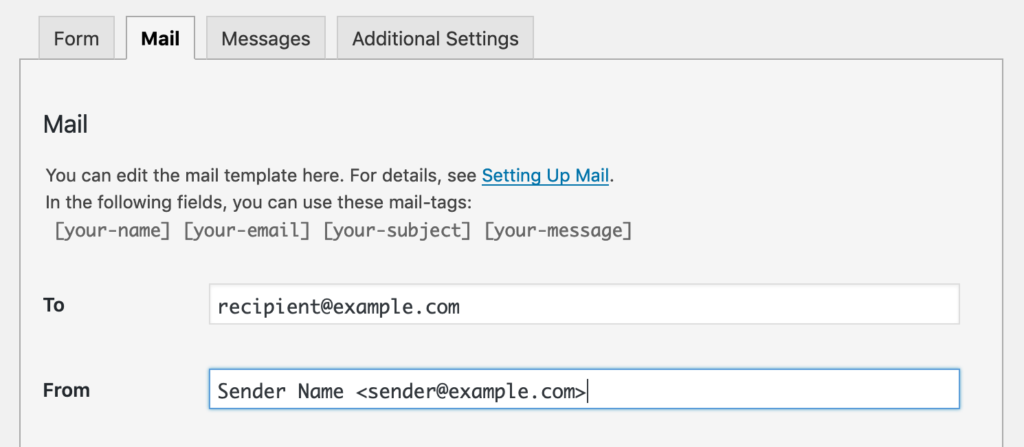
Mail that comes through the contact form shows “WordPress” as its sender name. How can I change this?
A sender’s address is comprised of a sender’s email address and an optional sender name. WordPress assigns “WordPress” as a sender name if the settings have not been formatted. If you want to use another name so that “WordPress” no longer appears as your sender name, you must explicitly set the sender name in the From field in the Mail section as the following:
Can I place a contact form outside a post?
Yes. You may place a contact form in a text widget as well.
See also: Can I embed a contact form into my template file?
Can I embed a contact form into my template file?
Yes, but you cannot insert a contact form shortcode into your template file directly. You will need to pass the code into apply_shortcodes() function and display its output like this:
<?php echo apply_shortcodes( '[contact-form-7 id="1234" title="Contact form 1"]' ); ?>
After submitting the form, I get an error message stating “There was an error trying to send your message.” What is wrong?
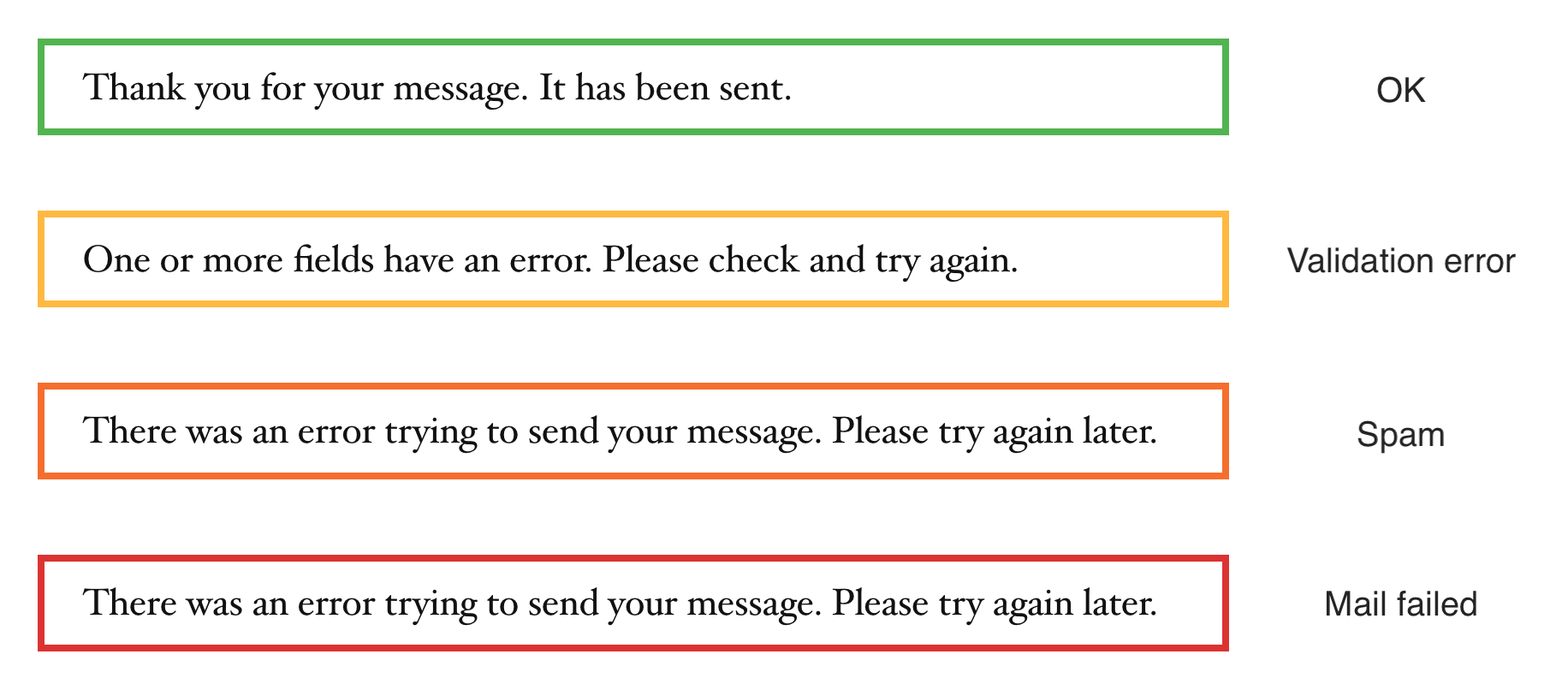
There could be two causes for this. The first is actual mail server trouble, where email cannot be sent. In this case, the error message would be surrounded with a red border line. Contact your server admin.
The second possible cause is that the form submission is under suspicion of spam. In this case, the error message would be surrounded with an orange border line.
See also
- I get an error message with a red border. So, how can I solve this?
- Why do I get an error message with an orange border?
- I see a response message “Thank you for your message. It has been sent.” with green border, but I never receive a mail for that.
- Why do you use the same message for mail failure and spam cases?
I get an error message with a red border. So, how can I solve this?
The red border means that Contact Form 7 tried to send mail with wp_mail(), but it failed. To solve the issue, you need to find out the actual reason why it is failing in the first place.
There could be various reasons such as the mail setup wasn’t valid.
See also: Red border error issue on WordPress 4.4.1
The sending would also fail if the mail server was down, inaccessible or experiencing other problems. In this case, it will be more difficult to solve the issue by yourself. I would suggest you contact your host for support. They may be able to check the error logs to find out the reason for the failure.
In some cases, it is possible to solve this issue by using another mail server.
Why do I get an error message with an orange border?
The orange border is a sign of spam. It indicates that one of the spam protection modules has detected suspicious activity in the form submission.
Contact Form 7 has several different spam protection modules such as Akismet, reCAPTCHA, and disallowed list. To determine exactly which module has blocked the submission, it is recommended to use the spam logging feature.
I see a response message “Thank you for your message. It has been sent.” with green border, but I never receive a mail for that.
Showing the green border message means that the PHP function for sending the mail has certainly completed successfully. So if you can’t receive the mail, it’s highly possible that the mail has been kidnapped or killed after that.
If you can check the log of your mail server, it could give you some clues. Spam filter often causes this kind of problem.
See also: Best practice to set up mail
My contact form always redirects to 404 error page after submission.
This problem is caused by a combination of two misconfigurations. First, AJAX JavaScript is not functioning on your contact form. Due to this problem, your contact form needlessly redirects after submission. Second, your contact form uses unavailable words in the names of input fields. This issue confuses WordPress, resulting in the 404 (“Not Found”) error.
The spinner icon shows up once I submit a form, but then nothing happens.
This is most probably due to a conflict between plugins/theme. Try deactivating all other plugins and switching to the default theme.
See also: Why you are advised to deactivate plugins and switch to the default theme.
My contact form behaves oddly on certain browsers.
It is common that the same contact form looks different depending on the browser. Especially when you have date input fields or numerical value input fields in the form, you may see a great difference. If it is just a visual difference, and you can use the form without problems, you don’t have to worry about that. It is completely normal.
If it is not just a visual difference and is preventing use of the form, the difference of behavior between browsers might indicate that there are errors in HTML, CSS, or JavaScript used on the page. In this case, you need to debug them. Utilize developer tools that your browser provides, or ask for help on the support forum.
I want to use contact form in my language, not in English. How can I do that?
Contact Form 7 has been translated into many languages. You can use it in your language if there is a language pack.
For more information, see Contact form in your language.
CAPTCHA does not work; the image does not show up.
To use CAPTCHA, you need GD and FreeType library installed on your server. Also, make sure that CAPTCHA’s temporary folder is writable. For details, see CAPTCHA.
See also: Tips for troubleshooting Really Simple Captcha issues
CAPTCHA’s text input box is working on Internet Explorer, but not with Firefox. I cannot enter the code.
This is a well-known issue caused by misusing the <label> element. Make sure you are using it correctly.
This is good:
[captchac your-captcha]
<label>Enter the code: [captchar your-captcha]</label>
This will not work correctly:
<label>[captchac your-captcha]
Enter the code: [captchar your-captcha]</label>
File upload and file attachment do not work.
See File uploading and attachment and make sure that your configuration is correct.
Does Contact Form 7 support HTML5 input types?
Yes. Contact Form 7 3.4 and higher support form-tags corresponding to these HTML5 input types: email, tel, url, number, range and date.
If you don’t wish to use HTML5 input types, you can disable this by adding the following code into your theme’s functions.php file:
Note that even the most current browsers partially support HTML5. For example, the latest Firefox doesn’t support the date input type (that allows you to choose a date from a calendar user interface) and the number input type (that allows you to input a number value from a spinbox UI) yet — so Firefox provides a general text input field as a fallback instead of a calendar and spinbox UI. This may confuse users because they can’t detect what type of input value this field expects. So, you may feel that it is better to wait for all browsers to support all HTML5 features completely.
But you don’t need to wait! Contact Form 7 offers a better solution. Contact Form 7 is able to provide jQuery UI-based fallback for the date and number input fields. By using this solution, you can provide calendar UI for the date field and spinbox UI for the number field, respectively, even with Firefox or Internet Explorer.
By default, this fallback feature is disabled because it loads extra JavaScript and CSS (makes for poor performance) and it is only necessary for websites that use the date or the number input fields. If you use the date or number input fields and wish to use this jQuery UI-based fallback feature, add the following code into your theme’s functions.php file and activate the feature:
See also: Loading JavaScript and Stylesheet Only When it is Necessary
Why does my email address input field look different than other text input fields?
In HTML5, the email input field is represented as <input type="email" />. The text input field is represented as <input type="text" />. There is a difference in the ‘type’ attribute value.
Review your theme’s CSS style sheets. You will find some items using attribute selector like this:
This ‘input[type=”text”]’ selector doesn’t match the email field because it doesn’t have the ‘text’ type. If you wish to apply this style rule to email fields as well, add a selector that matches email fields:
See also: Styling Contact Form
Can I add id and class attributes to a form element?
Yes. You can add any id and class to a form by adding the html_id and html_class attributes into a [contact-form-7] shortcode.
Example:
[contact-form-7 id="1234" title="Contact form 1" html_id="contact-form-1234" html_class="form contact-form"]How can I export/import contact form data?
Because Contact Form 7 stores its contact form data as a custom post (post type: wpcf7_contact_form), you can export and import form data via Tools > Export and Tools > Import in the WordPress admin screen.
In the Export menu, choose Contact Forms if you want to export contact form data only. You can also choose All content (this includes contact form data).
Can I add text labels to input fields?
Yes. You can use any HTML markup in a form template. Try using label element like this:
<label>
  Your name [text* your-name]
</label>
You can also separate the label and form-tag. In this case, you need to add the for attribute to the label element. The for attribute value refers to the id option value in the associated form-tag:
[text* your-name id:namefield]
Pay attention when labeling checkboxes or radio buttons. A label element should not contain multiple form controls.
For example, you can’t do this (because this [checkbox] tag generates three checkboxes):
<label>
  Your country [checkbox your-country "China" "India" "San Marino"]
</label>
Instead, use the use_label_element option:
[checkbox your-country use_label_element "China" "India" "San Marino"]
The current Contact Form 7 plugin uses label elements in its default form template, but the usage of them is limited (we need to balance simplicity and accessibility in default configuration). If you want the default form template to use label elements more powerfully, I recommend an add-on plugin called Contact Form 7: Accessible Defaults.
See also
Does a contact form work on a page with JavaScript deactivated?
Yes. Contact Form 7 is designed to be workable regardless of whether JavaScript is available on the page or not. However, Ajax submission and some other features do not work because they require JavaScript.
Features that require JavaScript include:
- Ajax submission
- HTML5 fallback using jQuery UI
- Exclusive checkbox
- Real-time character count
- Autocompletion for URL input
- DOM events
REST API is deactivated on my site. Can I use Contact Form 7?
Contact Form 7 4.8 and later versions use the WordPress REST API for Ajax submission. If the REST API isn’t available on your site, you have to give up using Ajax submission. You can still use non-Ajax submission. To deactivate Ajax submission and use non-Ajax submission, stop loading the JavaScript on pages on your site.
You may want to reevaluate the deactivation of REST API. REST API is one of the most fundamental functions of current WordPress. All security issues reported in the past have been resolved. Consider reactivating it.
After submission, my contact form redirects to a URL followed by an unfamiliar code like #wpcf7-f123-o1. Why?
This is because your contact form is working in non-AJAX submission mode. The following article explains possible reasons why a contact form doesn’t work in AJAX submission mode.
DOM event doesn’t work.
First, make sure that the DOM event is correctly fired. The event handler functions will be executed only when the event is fired.
Contact Form 7’s DOM events, such as wpcf7mailsent or wpcf7submit, are fired in the process of an AJAX form submission. Therefore, when your contact form is working in non-AJAX submission mode, none of the events will be fired.
Also, an event handler function won’t work when there are bugs in your JavaScript code. You can detect JavaScript errors using web developer tools built into your web browser.
Is Contact Form 7 compliant with GDPR?
I wish I could just answer, “yes”, but unfortunately it is not that simple. Ultimately, no WordPress plugin in itself can provide legal compliance, and the responsibility for making your contact forms compliant with legislation lies with the user (you).
The only thing we can do is assist you with some advice. I’ve written a post that explains how you can make privacy-friendly contact forms, so please refer to it.
https://contactform7.com/2018/04/16/how-to-make-privacy-friendly-contact-forms/
Does Contact Form 7 track our personal data by stealth or transfer the data to external servers?
No. Contact Form 7 never does such evil things. Remember that WordPress.org’s guidelines prohibit plugins on its directory from tracking users without their clear consent.
I get spam messages through my contact forms. How can I stop them?
You can protect your contact forms with the anti-spam features that Contact Form 7 provides.
Contact Form 7 supports spam-filtering with Akismet. Cloudflare Turnstile blocks annoying spambots. Plus, using disallowed list, you can block messages containing specified keywords or those sent from specified IP addresses.
Can I edit the label text on a file uploading field?

No, you can’t. Because the text is built into the browser you use, it cannot be controlled through a web application.
If you want the text displayed in a different language, you won’t need to change it manually because the text is automatically rendered in the language of the browser’s language preference. Thus, English users see an English label, Japanese users see a Japanese label, etc., without your assistance.
Why do field names start with ‘your-‘?
All fields in the default form template have a ‘your-‘ prefix in their names, such as ‘your-name’, ‘your-email’, ‘your-message’, etc. Contact Form 7 adds this ‘your-‘ prefix in order to avoid reserved or unavailable field names.
Why do you use the same message for mail failure and spam cases?
Contact Form 7 by default displays the message, “There was an error trying to send your message.” in cases where email sending has failed for any reason, and uses the same message in cases where spam activity has been detected. You might wonder why it doesn’t say something different like “Form submission aborted because we know you are a spammer!” or something in spam cases.
Not telling the submitter the fact that you’ve detected spam attempts in their submission is a kind of worldly wisdom. If the spam detection was true, and the submitter was a real spammer, you shouldn’t give them extra information that you know that. On the other hand, if the spam detection was a false alarm, you wouldn’t want to make them angry by calling them a spammer. In either case, it is wise to not share the reason.
Can I get previous versions?
Yes, you can download previous versions of this plugin from WordPress.org. But please be aware that using previous versions of plugins on production websites is never recommended as it exposes your sites to security risks.
Using outdated plugins is like saying aloud to malicious attackers all over the world, “We welcome you! This site is managed by an administrator who is not interested in security at all!”.
I get the error message of “This contact form is placed in the wrong place” instead of the form itself. What does this mean?
This message appears when you place a contact form in an incorrect place, in particular, inside another <form> element. That is an invalid HTML that causes unexpected erroneous behaviors to the form. To fix the error, move the contact form outside a <form> element.